Can I use html5, CSS, JS use something frontend coding?


You want to know if it works before you try, this is happening everyday during you working time. I know I know, and Alexis Deveria knows as well, oops.

Alexis Deveria has build this site for every frontend workers, to list you all the result that how major explorers are support to _____ !, just type codes that you are looking for and get results before you get into trouble all day long.

Site:Can I use...

RGB to, does any color source transfer for you!


You have learned visual identity system, and you care about the color code usage in any of your client's project. You got trouble with the Pantone color source for web site designing, web color source for paintings, the monitor troubles, you image that if someone made a color database for all the color source transfer.

RGB.to just does this job, transferring any of color source to another color source, it just amazing!!

Link:RGB.to


Fake image please, "Call" a fake image immediately!


But it's just a real image.

Sometimes we will need an image just for preview, but usually we will need to open photoshop for a right resolution. If you are someone like I said, the Fake image please brings you a new solution for it.

This guy is talent, the Fake image please is an online tool, what you will need to do is just "call" an address for the image, bg colour, text colour, text content...just like this official sample codes:

img src="http://fakeimg.pl/300/"
img src="http://fakeimg.pl/250x100/"
img src="http://fakeimg.pl/250x100/ff0000/"
img src="http://fakeimg.pl/350x200/ff0000/000"
img src="http://fakeimg.pl/350x200/?text=Hello"
img src="http://fakeimg.pl/350x200/?text=World&font=lobster"

Easy, isn't it?


BuiltWith.com, find out more technologies behind the site


BuiltWith.com answers the site techniques

Sometimes you just get no idea what technologies behind a site, BuiltWith is doing this for you. Just enter a site address, and it lists all the known technologies for you, example here for designerapps.blogspot.com.

Site: BuiltWith.com

And more, you may like to know more about each of the tech thing, click on the name, the BuilrWith has an analysis about how popular the tech is using in the world sites. Something may not that accurate however it counts.


Screenqueri.es the best responsive design online preview tool, EVER!


The must use service for responsive design

We did present the RWD bookmarklet the must have tool for responsive design. And I like to present Screenqueri.es as the best preview site I have ever used.

Over 60+ devices resolutions are ready for your test by simply select from the drop list, and of course you can rescale canvas for your own specifically needs. You will need to sign in for the try, and enter http url or even a localhost path, can you imagine it?

Site: Screenqueri.es

Not only iPhone, iPad, most of the major android devices are available now or even Kindle, tablet pcs. The Screenqueri.es is the must use free service for the responsive site design.

Csswarp, the font wrap helper


Csswarp helps you to form your fonts that fit with curve line or a circle. It works just like Adobe illustrator, and you get html+css in sult.

CSS3 Generator


CSS3 Generator focus on the container generating, it helps you to create a pure css contianer whatever the dimention, colors, shadows.

Site: CSS3 Generator

Demo:


The Responsinator, responsive site design previewer

So you have designed a responsive site, and you test it by using iPhone, iPad, android devices..etc. It's just a nightmare that you keeps working like that in every small editing. The Responsinator makes it easier, just paste site address and click OK, you will see it how it is displayed in most of major mobile devices.(iPhone3, 4, 5, iPad, android, kindle in both horizontal and vertical portrait)

Site: The Responsinator


Gridpak, responsive site grid system tool


I used to count the width by using calculator all the time when starting a responsive web design. Now the Gridpak bring me a new startup. It does an awesome grid system for your site structure in a minutes, and you get png, html, css, js, scss, less files. It's a free profession service!

Site: Gridpak

Gradient Generator

Gradient Generator

Gradient Generator do service as it's name and is the best css gradient generator.

Site: Gradient Generator

Special feature: Gradient Generator supports capture colors from an image, simply upload an image you want to get color from, and it analyses colors as your default color base.

Demo:

Easing functions


So are you a frontend designer? admit it you should completely face the codes.

A Russian talent guy build a Easing open source project on Github, provides js, css, scss editions for you. Now you can preview all of it and get it immediately.

Site: http://easings.net/
Author: https://github.com/ai

ajaxload gif


The ajax loading gifs are something an open source(ouch!), people do use it like never thought about change it for the site ui. This site offers a tool for you to have an ajax gif that matchs your site color. There are many base gif animations, unfortunately you can't custom a new gif there this time.

Demo:

Site: http://ajaxload.info/

Cubic-bezier, the CSS motion curve editor


Do you usually code CSS? If so the Cubic-bezier will be one of your best firend.
Cubic-bezier helps you preview the CSS motion curves, and export directly in css language for you.

RWD bookmarklet, Web designer must have, a great responsive site test tool


To test a responsive site is sometimes a trouble job. Now your explorer can with this feature by just one click.

Site: http://responsive.victorcoulon.fr/

How to use the bookmarklet?
In the center of screen the RWD Bookmarklet is a tool, simply drug and drop it onto your bookmark bar. Here is an example by using Chrome:
Get the bookmarklet works for you
And now your explorer then adds an test tool, whatever site you are exploring, click it and go into test mode, cheers!

How to test a site?
Click on any of the mobile device icon, and you see the preview result.

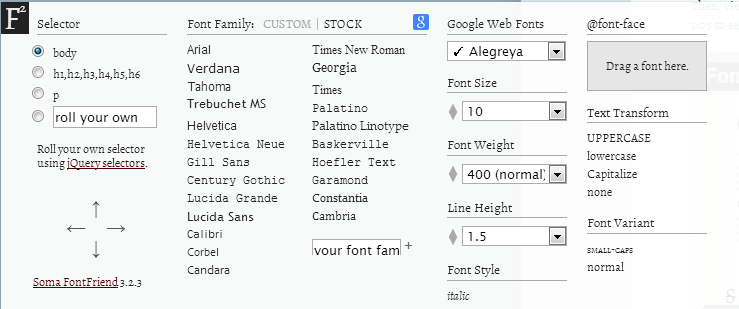
Fontfriend, preview fonts without editing your html


Typography is an important part in web design, and it is pain if you decide to change it after all done. However there is a good friend that will help you love this job.

Fontfriend is a bookmarklet, drag and drop it onto you bookmark bar, and you own this new feature. Try it now and you will love it.

Of course it supports Google font!

CSS3 Click Chart samples

CSS3 Click Chart provides common use CSS codes with sample code for you. All the codes support the major explorer(includes IE8).

Demo:
Drag the right-bottom to see how this great fluid container works!

Zbugs helps you to reduce weight

Zbugs is a reduce weight site tool. It focus on optimization of CSS and Javascript. It look like not that helpful, but if you are sometimes coding 5000 line of all CSS language, and you see how important it is.

In fact, it just delete all the blanks and skip lines.

Color Scheme Designer, the color coder


Are you a theme or template designer? The ColorSchemeDesigner may be the best color planer for you. A logical color planer helps you get the colors by well known color system. By using this site tool, you can pick the definite colors.

Site: ColorSchemeDesigner

Kular, a color community for designers


Sometimes we are confused under the work pressure, we might not that trust our color plans. The Kuler is a community for color talks, just type a keyword and search for the best color plans that was planed by a designer and is voted by designers.

Site: Kuler

The Kuler is owned by Adobe, it free and is integrated with Photoshop, you can also open it from photoshop extension.

Each of the CSS color has a name


There is not only the pure color have a name, the 147colors.com colloected color names for you.

Site: http://www.147colors.com/grid/

It's cool hum? Now you are ready for picking up some colors in you case, and your boss will be amazing on you. :)